
Get guides like this in your inbox every Thursday
Read it here free, or subscribe and get every new one, plus the AI news that matters.
Free, plus 4 starter guides when you join. One email a week. Unsubscribe anytime.
What is the Instagram Agent Skill for Claude?
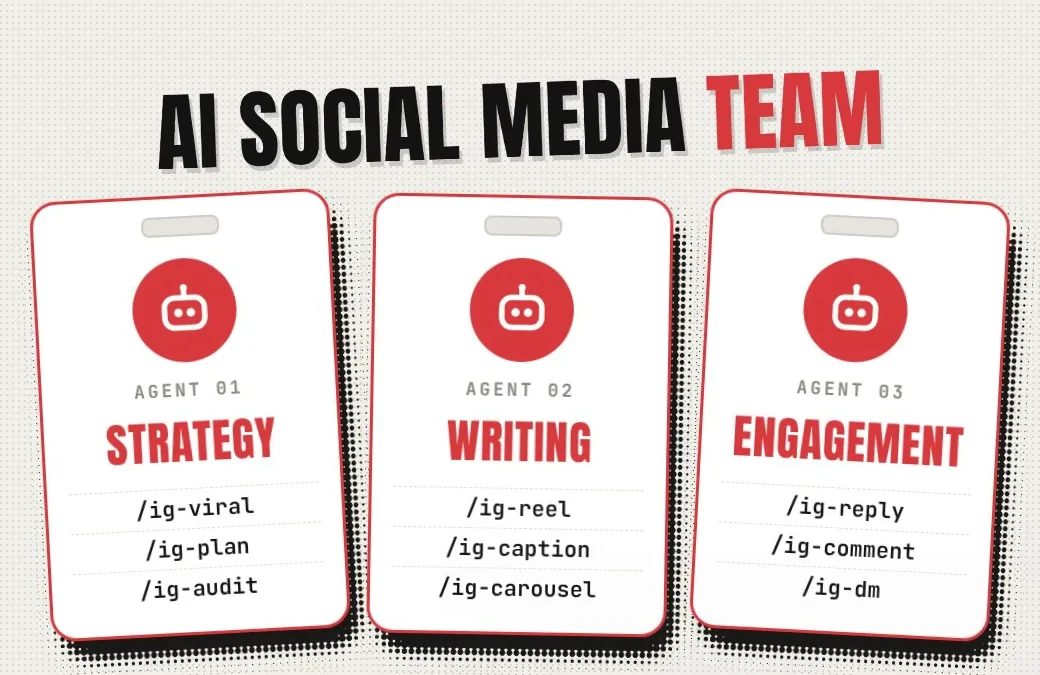
The Instagram Agent Skill is a free pack of 13 Claude skills that writes and plans the content for an Instagram account. Jake Schincariol built the Instagram Agent Skill and shares it on GitHub under the MIT licence. Each skill is a slash command in Claude Code: /ig-reel scripts a Reel, /ig-caption checks a caption, /ig-viral studies what's working in your niche and /ig-profile scores your profile out of 100.
Setup takes two steps. Step 1: paste the GitHub link into Claude Code and ask Claude to install the skill. Step 2: give Claude three of your own reels, so every skill writes in your voice.
The Instagram Agent Skill needs no signup, no API key and no Instagram password, and the pack never posts for you. The 13 skills cost nothing, but Claude Code needs a paid Claude plan (Pro or above).
step 1Step 1: Install it
Open Claude Code, either in the Claude desktop app or in your terminal, and paste this:
https://github.com/Jakeschincariol/instagram-agent-skill

Install this skill, then confirm /ig-reel works.
Claude Code does the rest. If the /ig- commands don't show up afterwards, restart Claude Code.
Prefer to do it by hand? On a Mac or Linux, run these two lines in the Terminal app, then restart Claude Code. On Windows, use the paste-in option above.
git clone https://github.com/Jakeschincariol/instagram-agent-skill.git
cp -r instagram-agent-skill/skills/ig-* ~/.claude/skills/
Or add it as a plugin, from inside Claude Code:
/plugin marketplace add Jakeschincariol/instagram-agent-skill
/plugin install instagram-agent
Installed it as a plugin? The commands may show up with the plugin's name in front, like /instagram-agent:ig-reel instead of /ig-reel.
Step 2: Teach it your voice
Every skill in the pack reads one file, voice.md, which describes how you talk. Jake's instructions say to spend ten minutes on it first, because on Instagram you have to say the words out loud. The quickest way is to let Claude write it from your own reels:
Here are three of my own reels (scripts or transcripts):
[paste them here]

Write my voice.md from these and save it to ~/.claude/instagram/voice.md.
Prefer to write it yourself? Copy templates/voice.md from the pack to ~/.claude/instagram/voice.md and fill it in.
What does each of the 13 skills do?
The 13 skills fall into the three jobs from the reel: strategy, writing and engagement. Type the command, then say what you want in plain words.
strategyStrategy · 4 skills
Writing · 6 skills
Engagement · 3 skills
Which skills should you use first?
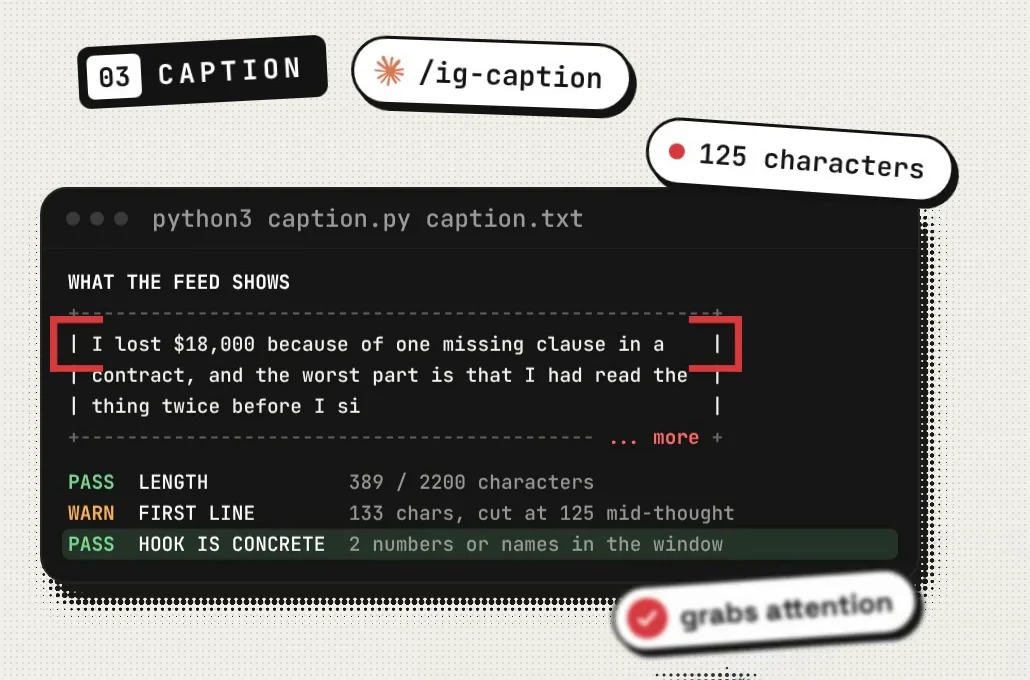
Start with three that take one Reel from idea to post: /ig-viral to find what's working, /ig-reel to script your version and /ig-caption to finish it. Once those feel easy, here's a simple routine for all 13:
- Once:
/ig-profile, for a score out of 100 and your profile fixes, most important first. - Once a month:
/ig-viralfor a fresh swipe file from your niche, then/ig-auditto see what worked in your own posts. - Every week:
/ig-plan, for the week's posts, formats and timing. - Before each post:
/ig-reelor/ig-carouselfor the script or slides, then/ig-captionto write and check the caption. - On days you post Stories:
/ig-story, for the day's Stories in order. - When a draft sounds stiff:
/ig-human, to put it back in your voice. - After you post:
/ig-replyfor your comments,/ig-commentfor other people's posts and/ig-dmfor your DMs. - When you make something long:
/ig-repurpose, to turn one video, podcast or newsletter into a week of Reels and carousels.
Jake's notes in /ig-viral say to run it monthly, not daily, because a hook formula lasts a season.
Five prompts to start with
/ig-viral I post about [your niche]. Accounts to study: [6 to 12 public accounts in your niche]. Show me which of their Reels beat their usual views and why, then save my swipe file.
/ig-reel Idea: [your idea in one line]. Give me three scored hooks, the script, the on-screen text and a 30-second beat sheet.
/ig-caption Write the caption for this Reel: [paste the script]. Show me what the feed shows before "more".
/ig-profile Here's my bio: [paste it]. I post about [your niche]. Score my profile, then rewrite it, biggest fix first.
/ig-reply Here are the comments under my latest post: [paste them]. Sort them by type and draft my replies.
What won't the Instagram Agent Skill do?
- It won't post for you. Every skill ends with a copy-ready block, and you post it yourself. Jake built it that way on purpose: tools that post, comment, follow or DM for you break Instagram's terms and get accounts blocked.
- It won't ask for your Instagram password. There's no signup, no API key and no account to connect. Never give Claude your password.
- It won't scrape Instagram.
/ig-viralreads about a dozen Reels from each account at human speed, in your own browser with you there, or you paste the numbers in. It copies the formula behind a post, never the video itself. - It won't invent numbers. If a draft needs a number you haven't given it, it leaves a gap like
{{your number}}for you to fill. - It won't pick your winners. Jake tested the hook scorer on 74 real hooks. It's good at catching weak hooks, but barely better than a coin flip at telling which of two decent hooks will do better. Use it to cut weak hooks, then trust your own results.
- The skills are free; Claude Code isn't. The 13 skills cost nothing, but Claude Code needs a paid Claude plan (Pro or above). My complete Claude guide compares the plans.
- No Claude Code? Paste one skill's
SKILL.mdfile at the top of a normal Claude chat and it works there. You lose the five small Python tools, which matter most for/ig-reeland/ig-human, but the rest works. - The tools need Python 3. They run on your own computer, need nothing else installed and send nothing anywhere. If your computer doesn't have Python 3, ask Claude Code to set it up.
Who made the Instagram Agent Skill?
Jake Schincariol made the Instagram Agent Skill and released it free under the MIT licence, so anyone can use it and change it. The full instructions and every update live on his GitHub page. If a command here ever stops matching, his README is the one to trust.
You'll also find copies of the pack under other GitHub names, some with extra skills added. This guide follows Jake's original.
all the linksLinks 🔗
- Instagram Agent Skill (GitHub) — Jake Schincariol's free pack, MIT licence
- Edit your videos with Claude Code — Turn your script into a finished Reel
- Make AI writing sound like you — A humanizer skill for everything else you write
- The complete Claude guide — Every plan, including which ones include Claude Code
- 25 Claude GitHub repos worth actually using — More free skills for Claude Code
Liked this? Get the next one in your inbox.
Every Thursday I research the latest AI systems and workflows, then break the best one down into simple steps, with prompts you can copy. Plus the AI news that changes what you can do.
Free, plus 4 starter guides when you join. One email a week. Unsubscribe anytime.