
Get guides like this in your inbox every Thursday
Read it here free, or subscribe and get every new one, plus the AI news that matters.
Free, plus 4 starter guides and 55 video effects for Claude when you join. One email a week. Unsubscribe anytime.
What is Couch TV?
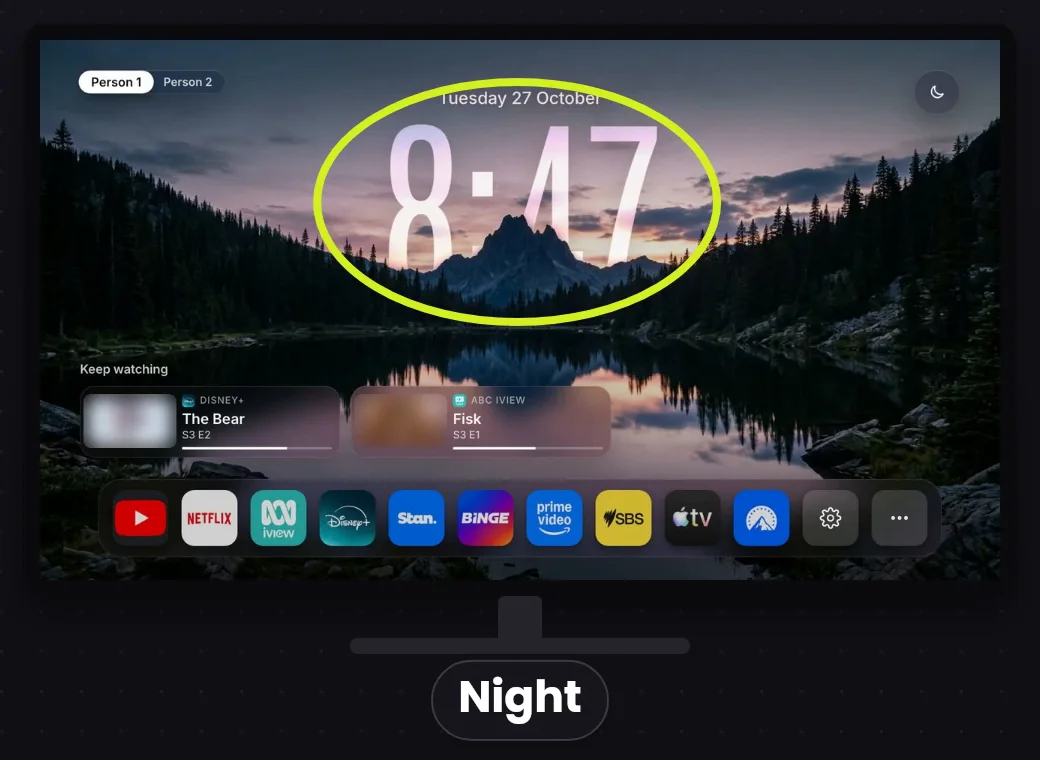
Couch TV is a free, open-source home screen for your TV. Couch TV replaces the busy, ad-filled home screen on Google TV and Android TV with a clean one: your apps in the order you choose, a Keep watching row for each person, and a big glass clock over scenes that change every 20 seconds. The project is published on GitHub as Seagey/couch-tv under the MIT licence.
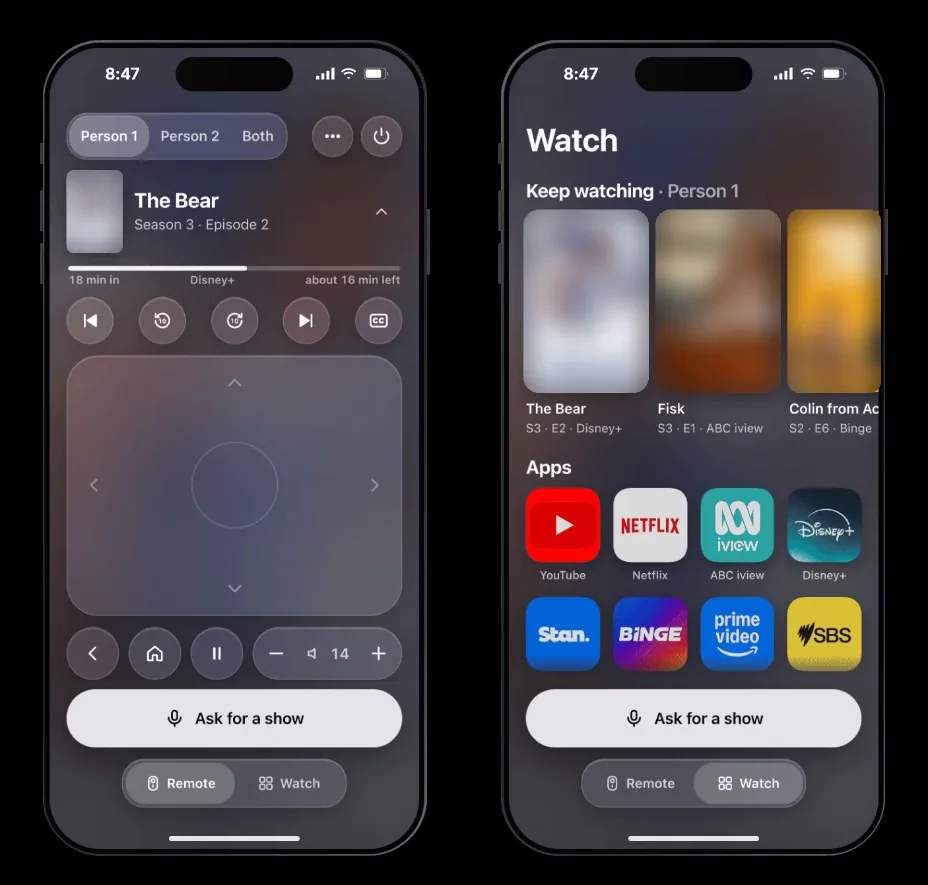
With a small helper program on a computer at home, your phone also becomes the remote, with arrows, volume, typing and power. For example, type a show's name and Couch TV finds where the show streams and starts playing. An optional assistant, powered by Claude, handles asks like 'put on something funny'. Setup has three routes: first, ask Claude Code to set Couch TV up; second, use the free Setup app for Mac and Windows; finally, follow the step-by-step guide by hand. The software costs $0, and version 0.12 came out in November 2026.
check your TVWhich TVs does Couch TV work on?
- Google TV and Android TV: the full home screen, including the Home button.
- Fire TV (Fire OS 6, 7 and 8): works as your home screen, but Amazon's home flashes up first when you press Home. Newer Fire TV devices on Vega OS are more limited, so check the README's table.
- Samsung and LG: runs as an app rather than replacing the home screen. It opens a few seconds after the TV turns on, but only with a computer at home that stays on. The TV's own Home button still opens Samsung's or LG's menu.
What are the three ways to run Couch TV?
- Home screen only. Just the new home screen, with your normal remote. No computer needs to stay on.
- With a computer bridge. A Mac, a Linux box or a Raspberry Pi at home stays on and adds the phone remote, show search (put on Bluey), turning the TV on from your phone, Keep watching across apps and the optional assistant.
- All on the TV. The bridge runs inside a TV app instead of on a computer. Fully supported on older Android TV, partly on Google TV.
With the computer bridge, the assistant uses Claude through your own Claude plan in Claude Code. On the TV, you add an API key instead; by default it uses Claude Haiku 5.5, which the docs estimate at about a fifth of a US cent per ask.
How do you set up Couch TV?
Option 1, with Claude Code. Download the project, open its folder in Claude Code (or another coding agent) and ask it to set things up. It reads the project's instructions, finds your TV, asks which way you want to run it and a few questions (who watches, the look, your apps), reads the plan back, and changes nothing until you say yes. Your computer has to be on the same Wi-Fi as the TV.
git clone https://github.com/Seagey/couch-tv.git
cd couch-tv
claude
Set this up on my TV.
Option 2, the Setup app. A free app for Mac and Windows at couchtv.sites.underseage.studio. It checks whether your TV will work before changing anything. It covers Google TV, Android TV 7.1 and up, and Fire OS 6 to 8, but not Samsung or LG. Setting up from a phone alone only gets you part of the way.
Option 3, by hand. Follow docs/SETUP.md in the repo. It also explains how to undo everything and put your old home screen back.
What else does Couch TV include?
- Five scenes behind the clock (Night, Golden hour, Waterline, Fog and Dawn) plus a Classic look, or your own photos.
- Keep watching for up to 10 shows per person, with the bridge or the TV app.
- Kids mode with a parent PIN.
- 16 languages and smart home cards for Home Assistant.
- Your data stays home. Settings, keys and watch history stay on your own computer and TV.
What should you check before installing Couch TV?
- Check your TV first. Google TV and Android TV get everything; Fire TV, Samsung and LG get less. The Setup app tells you before you change anything.
- The best features need a computer that stays on. The phone remote, show search and Keep watching across apps all use the bridge.
- The assistant is optional and may cost a little. With the bridge it uses your Claude plan; on the TV it uses an API key you pay for.
- You can undo it.
docs/SETUP.mdexplains how to put your old home screen back. - It's a young project. Couch TV changes often (version 0.12 came out in November 2026), so follow the README if anything here differs.
Links 🔗
- Couch TV (GitHub) — The project, MIT licence
- Couch TV Setup app — Free for Mac and Windows; checks your TV first
- 25 Claude GitHub repos worth using — More things to build with Claude Code
Liked this? Get the next one in your inbox.
Every Thursday I research the latest AI systems and workflows, then break the best one down into simple steps, with prompts you can copy. Plus the AI news that changes what you can do.
Free, plus 4 starter guides and 55 video effects for Claude when you join. One email a week. Unsubscribe anytime.