
Get guides like this in your inbox every Thursday
Read it here free, or subscribe and get every new one, plus the AI news that matters.
Free, plus 4 starter guides when you join. One email a week. Unsubscribe anytime.
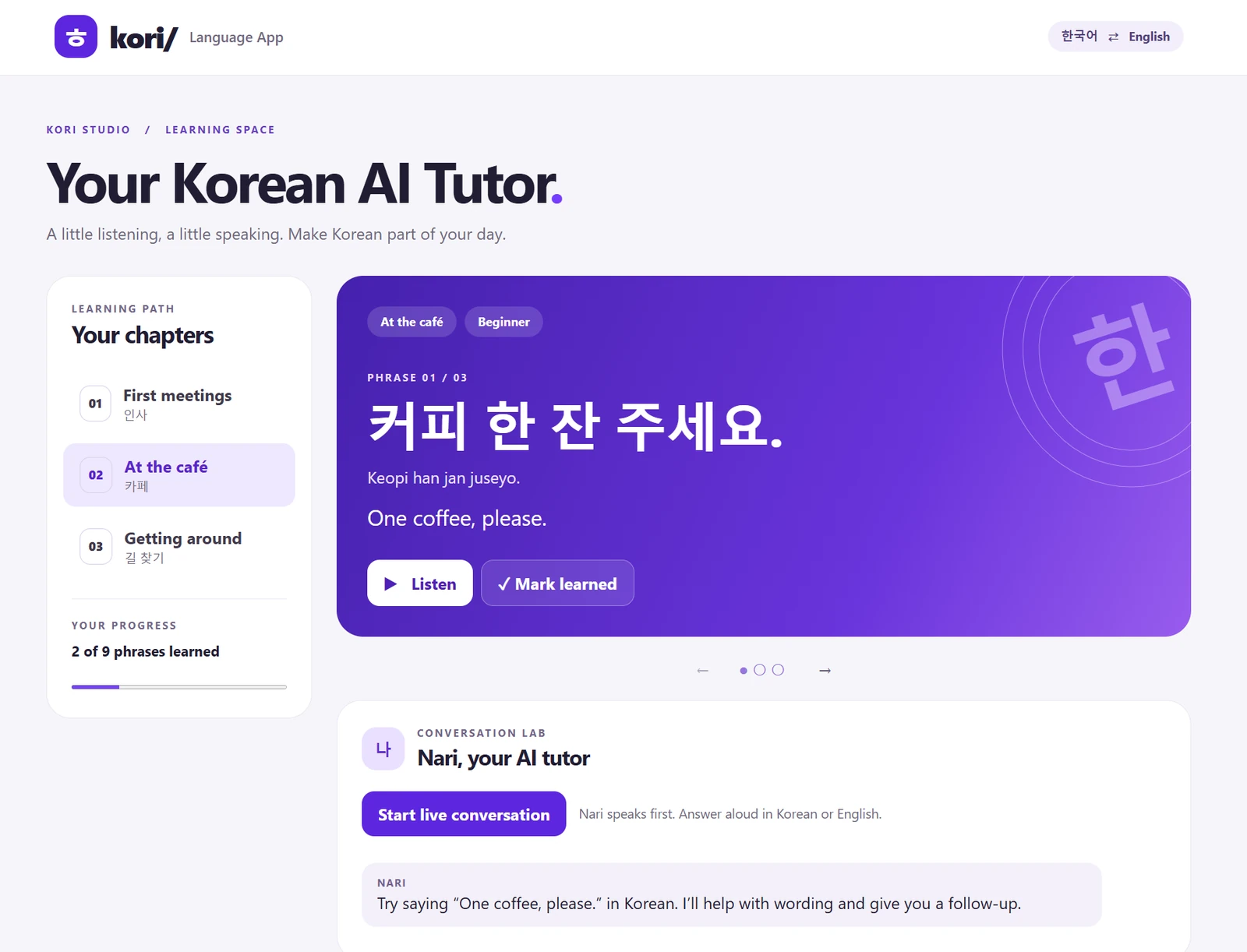
What is Kori, the AI Korean tutor?
Kori is a Korean speaking tutor I built with Claude Code and Inworld in November 2026. A tutor called Nari says a phrase, listens while you say the phrase back, and checks the words you actually said, out loud and in real time. Step 1: connect Inworld's MCP server to Claude Code. Step 2: paste one long prompt. Step 3: add your Inworld API key to the project. Claude Code writes the whole app.
The voice loop runs on Inworld. Speech-to-text hears you, Gemma 4 26B (an open model from Google) runs on Inworld Inference and decides what Nari says next, and Realtime TTS-2 speaks the reply in a Korean voice called Minji. According to Inworld, up to 90% of each repeated prompt is served from cache, so long practice sessions stay affordable.
You need Claude Code, which comes with a paid Claude plan, Node.js 20 or newer, and an Inworld account. Inworld's free tier includes up to 70 minutes of speech to start.
What do you need?
- Claude Code, on Pro or any higher Claude plan.
- Node.js 20 or newer. The Inworld command-line tool needs it. If you don't have it, install it from nodejs.org.
- An Inworld account at platform.inworld.ai.
- A microphone and Chrome, Edge or Safari.
Step 1: Connect Inworld to Claude Code
Open your terminal and run these one at a time. The first installs Inworld's command-line tool, the second opens your browser so you can log in, the third picks your Inworld workspace, and the last one connects Inworld to Claude Code.
npm install -g @inworld/cli
inworld login
inworld workspace select
claude mcp add inworld -- inworld mcp
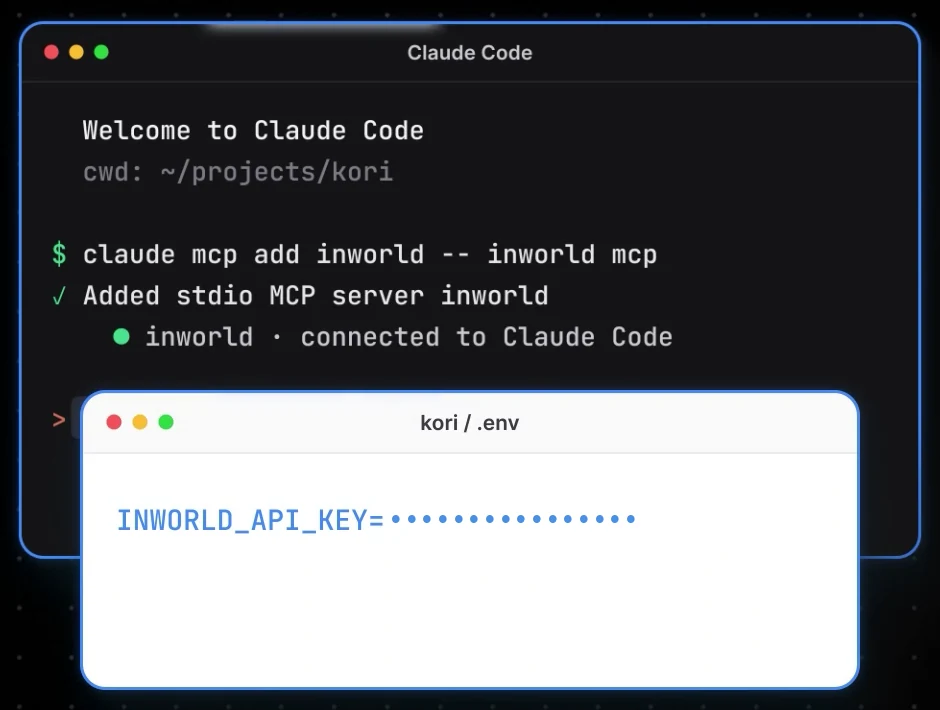
What this gives Claude: Inworld's MCP server lets Claude Code use Inworld directly: speech, voices, speech-to-text, its AI models, and your workspace. Optional: also run claude mcp add --transport http inworld-docs https://docs.inworld.ai/mcp so Claude can search Inworld's docs while it builds. It needs no key.
Step 2: Paste the prompt
Make an empty folder for the app and start Claude Code inside it:
mkdir -p ~/projects/kori
cd ~/projects/kori
claude
Then paste this whole prompt. It's long because it covers everything: the lessons, how Nari teaches, the Inworld setup, keeping your key safe, the design and the testing. Claude Code checks Inworld's docs first, then builds and tests the app.
Build a working Korean–English language-learning web app called Kori.

Work autonomously using sensible defaults. Inspect the existing project first and reuse its stack and patterns. If the folder is empty, create a lightweight responsive app with a Node.js backend. Implement and test the app through its normal user flows.

PRODUCT
Kori helps English-speaking beginners learn Korean through short lessons and live spoken conversations with Nari, an encouraging AI tutor.
Brand header: "kori/ Language App"
Main heading: "Your Korean AI Tutor"
Supporting text: "A little listening, a little speaking. Make Korean part of your day."

LESSONS
Create three selectable chapters with three phrases each.
1. First meetings
- 만나서 반가워요. — Nice to meet you.
- 안녕하세요. — Hello.
- 저는 학생이에요. — I'm a student.
2. At the café
- 커피 한 잔 주세요. — One coffee, please.
- 얼마예요? — How much is it?
- 감사합니다. — Thank you.
3. Getting around
- 역이 어디예요? — Where is the station?
- 여기서 내려요. — I get off here.
- 다시 말해 주세요. — Please say that again.
Each phrase should show Korean, accurate romanization, and English meaning. Include previous/next controls, phrase playback, a "Mark learned" toggle, and saved progress using localStorage.

LIVE AI TUTOR
The main learning interaction must be a real-time spoken conversation.
- Start button: "Start live conversation"
- Stop button: "End session"
- No typed reply field, Send button, or manual record-and-submit controls.
- Nari speaks first and introduces the selected phrase.
- The learner answers aloud.
- Detect turns automatically and support interrupting Nari.
- Nari responds aloud, gives gentle corrections, and continues a simple role-play.
- Allow the learner to speak Korean or ask questions in English.
- Keep each tutor turn short, usually one or two sentences.
- Explain one correction at a time and give the learner another chance.
- Accept natural variations and explain casual versus polite language accurately.
- Never claim to assess pronunciation from a text transcript alone.
Example:
If the target is "만나서 반가워요" and the learner says "만나서 반가워," explain briefly that adding 요 makes it polite, model the phrase, and invite the learner to repeat it.

INWORLD INTEGRATION
Use Inworld for the live voice experience.
Intended configuration:
- Tutor model: Gemma 4 26B A4B
- Previously documented model ID: inworld/models/gemma-4-26b-a4b-it
- Voice: Minji, the friendly Korean female system voice
- Speech model: inworld-tts-2
- Browser transport: Inworld Realtime API over WebRTC
Verify current model IDs, voice availability, API fields, authentication, and supported features before implementing. If something has changed, explain it and use the closest supported approach that preserves the requested experience.
Start with:
- https://docs.inworld.ai/llms.txt
- https://docs.inworld.ai/realtime/quickstart-webrtc
- https://docs.inworld.ai/portal/session-tokens
- https://docs.inworld.ai/api-reference/voiceAPI/voiceservice/list-voices
- https://github.com/inworld-ai/inworld-api-examples
Prefer the maintained official example. Read relevant documentation pages as Markdown by appending .md.
Use the same Minji voice for phrase playback and live tutoring. Keep model and voice configuration centralized.

SECURITY AND ACCESS
- Keep INWORLD_API_KEY exclusively on the backend.
- Reuse an existing server-side credential if available.
- Never print credentials or put them in frontend code, URLs, logs, or committed files.
- If credentials are missing, ask me to set them locally through a hidden prompt or a gitignored server-only environment file.
- Mint the appropriate session token on the backend for direct Realtime connections.
- Authenticate and rate-limit token routes.
- Keep development access local by default.
- Support a configured HTTPS deployment origin for mobile use.
- Do not expose the app publicly without explicit authorization.
- Avoid confusing expired-link errors. Show a useful session-expired screen and a clear recovery path.
- Provide a convenient restart command and explain any required sign-in after restart.

VISUAL DESIGN
Use this reference for the overall visual direction:
https://dribbble.com/shots/26154310-AI-Powered-Translate-and-Languages-App-Design
Create a polished, responsive interface with:
- Violet and lavender accents.
- Soft off-white backgrounds.
- Rounded cards, subtle borders, generous spacing, and readable typography.
- A chapter sidebar on desktop and a compact chapter selector on mobile.
- A prominent purple lesson card.
- Korean and English text that remains readable on small screens.

LIVE CONVERSATION SCREEN
When a conversation starts, open a dedicated voice screen.
- On desktop, use a centered rounded dialog with a softly blurred backdrop.
- On mobile, use a full-height screen.
- Use a soft lavender, pink, and pale-blue background.
- Put a luminous, iridescent orb in the center with a subtle dotted ring.
- Animate the orb according to actual connection and speaking/listening states.
- Respect reduced-motion preferences.
- Show clear states such as:
  "Connecting to Nari…"
  "Nari is speaking"
  "I'm listening…"
  "Your turn. I'm listening."
- Show a compact Korean ↔ English card with the current lesson phrase and its translation.
- Place "End session" at the bottom.
- Do not show a scrolling transcript box in the live screen.
- Avoid showing technical implementation details in the learner-facing interface.

RELIABILITY
Handle:
- Microphone permission denied.
- Insecure browser context.
- Missing or unavailable microphone.
- Blocked audio playback.
- Expired app sessions.
- Inworld authentication, quota, and network errors.
- Connection timeout or disconnection.
- Ending a session during connection setup.
- Starting another session after ending one.
Ending a session must stop microphone tracks, close WebRTC/data-channel connections, cancel pending requests, stop playback, and release resources. Clearly show when the microphone is active. Opening the voice screen must not depend on a browser pop-up window.

VERIFICATION AND DELIVERY
Verify:
- Chapter and phrase navigation.
- Progress persistence.
- Mobile layout and live-screen layout.
- Korean phrase playback with Minji.
- A real Gemma-powered tutor greeting and correction when credentials are available.
- WebRTC connection and session cleanup.
- Repeated start/end cycles.
- Useful recovery from denied permissions and expired sessions.
- No credential exposure in browser-delivered files.
Distinguish simulated-microphone tests from real-device microphone testing. Never claim that an untested feature works.
Deliver the working app, a usable local launch link, simple restart instructions, required configuration, and a concise report of what was tested and any remaining limitations.
Step 3: Add your API key
Claude Code will ask for your Inworld key when it needs it. To get one:
- Log in to Inworld Portal.
- In the sidebar, under Manage, click API Keys.
- Click Generate new key, choose the key type and permissions, then click Generate.
- Copy the Basic (Base64) value.
- Paste it into the project's
.envfile yourself, asINWORLD_API_KEY=followed by the key, and save.
Never paste your key into the chat. Put it in the .env file yourself. The prompt tells Claude to keep the key on the server side only, out of the app's code, links and logs.
Step 4: Talk to it
- Open the local link Claude Code gives you when it's done.
- Pick a chapter and click Start live conversation. Allow the microphone when your browser asks.
- Nari speaks first and gives you a phrase. Say it back, or ask a question in English.
- Click End session when you're done. That turns the microphone off.
Test: make a mistake on purpose. In First meetings, say 만나서 반가워 instead of 만나서 반가워요. Nari should explain that 요 makes it polite, say it again, and give you another try.
How does the voice loop work?
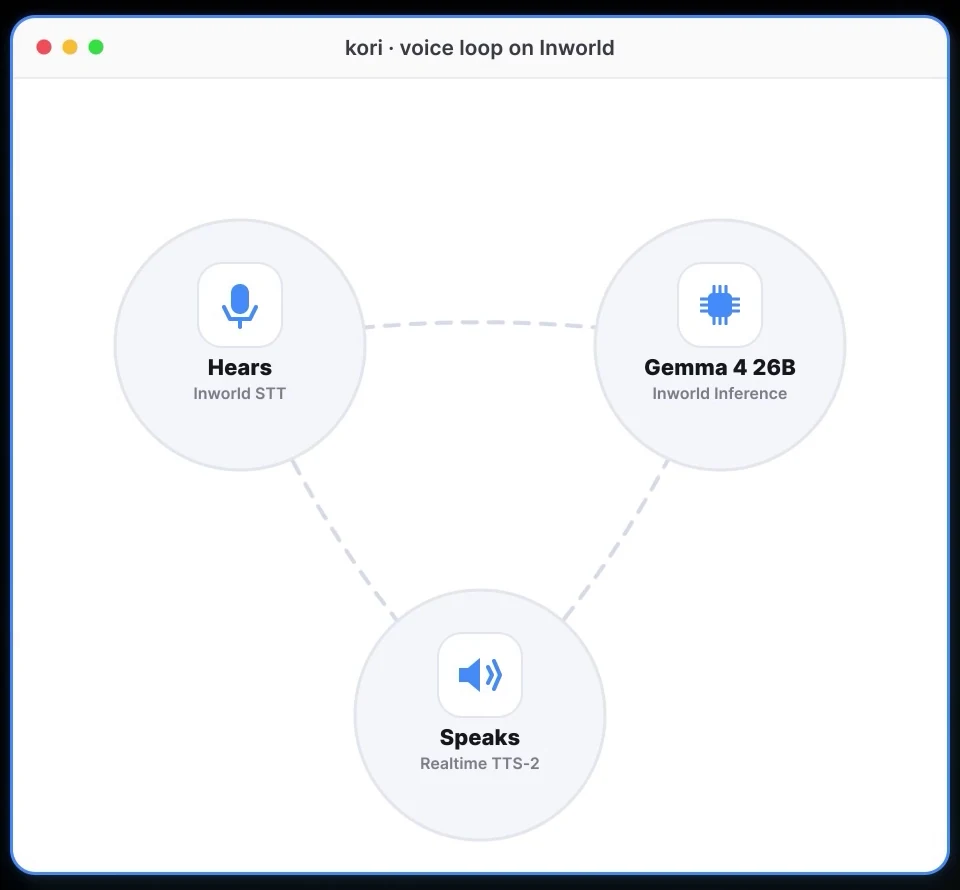
- Hears: Inworld's speech-to-text turns your voice into text and works out when you've finished talking.
- Thinks: Gemma 4 26B, an open model from Google running on Inworld Inference, writes Nari's reply. I picked it because it replies fast: Inworld says its first words arrive up to 7.8× faster than from the median provider on OpenRouter.
- Speaks: Realtime TTS-2, Inworld's newest voice model, reads the reply aloud as Minji, a young Korean female voice.
You're not stuck with Gemma. Inworld also runs other open models tuned for consumer apps, like GLM, DeepSeek and MiMo, and it can route to 100+ other models. Long conversations stay affordable too: Inworld says up to 90% of each repeated prompt can be served from cache, and cached input costs up to 99% less.
good to knowWhat does it cost, and what are the limits?
- It checks your words, not your accent. Nari works from what the speech-to-text wrote down, so it can catch a wrong word or a missing 요, but it can't really grade pronunciation. The prompt tells it never to claim it can.
- Korean listening isn't official yet. Inworld lists its own speech-to-text model for English, with a few other languages in testing, and Korean isn't on that list. If Nari mishears your Korean, ask Claude Code whether it can switch the listening step to Whisper, which Inworld also offers and which covers 99+ languages.
- Costs: Inworld's free tier includes up to 70 minutes of speech and 400 minutes of speech-to-text. After that you pay as you go, or from $25 a month on a paid plan. Gemma 4 26B starts at $0.07 per million input tokens and $0.34 per million output.
- It runs on your computer. The prompt keeps the app local and tells Claude not to put it online without asking you. Using it on your phone needs a secure web address, which Claude can help you set up.
Links 🔗
- Inworld — Sign up and see the voice models
- Inworld Portal — Where you make your API key
- Inworld CLI (docs) — Install, log in and the MCP server
- Inworld Inference — The open models and their speed
- The complete Claude guide — Which Claude plans include Claude Code
- 5 Claude Code shortcuts most people never find — Get more out of Claude Code
Liked this? Get the next one in your inbox.
Every Thursday I research the latest AI systems and workflows, then break the best one down into simple steps, with prompts you can copy. Plus the AI news that changes what you can do.
Free, plus 4 starter guides when you join. One email a week. Unsubscribe anytime.