
Get guides like this in your inbox every Thursday
Read it here free, or subscribe and get every new one, plus the AI news that matters.
Free, plus 4 starter guides when you join. One email a week. Unsubscribe anytime.
What is the Claude and Fish Audio voiceover workflow?
The Claude and Fish Audio workflow is a three-step way to make a voiceover for a faceless YouTube channel that acts out the script instead of just reading it. Step 1: pick a niche. Step 2: Claude researches the topic, writes a short script and adds directions in square brackets, like [suspenseful, slow] or [short pause]. Step 3: paste the script into Fish Audio, choose the Drama 3 model and a voice, and generate.
Drama 3 is Fish Audio's newest voice model, released on 13 October 2026. It treats each bracket as an acting note, the way a voice actor follows a director, so the same words can come out calm, grim or curious. The brackets themselves aren't spoken.
You need Claude for the writing (any plan works) and a Fish Audio account for the voice. You can try Drama 3 on a free Fish Audio account.
What do you need?
- Claude at claude.ai. Any plan works. Keep web search on, so Claude can look up and link its facts.
- A Fish Audio account at fish.audio. Free to start.
- A topic you'd happily talk about every week. That's your niche.
Step 1: Pick your niche
Anything you'd watch yourself works: space facts, history mysteries, money tips, true stories. If you're stuck, ask Claude:
I want to start a faceless YouTube Shorts channel. I'm interested in [your interests, for example space, history, money].

Give me 5 niche ideas. For each one:
- who it's for
- 3 example video titles that open with a "wait, what?" fact
- how easy it is to find reliable facts for it

Then pick the one you'd start with and tell me why in two sentences.
Pick one and stick with it, so the same viewers have a reason to come back.
step 2Step 2: Let Claude research and write the script
Start a new chat for your channel and paste this. It asks Claude to look things up first and show its sources, because one wrong number can cost you a viewer's trust.
You're the writer for my faceless YouTube Shorts channel about [your niche].

Today's video: [your topic, for example what would happen if Earth stopped spinning for one second].

1. Search the web for 3 to 5 surprising facts about it. List each fact with its source link.
2. Write a 30-second voiceover script, about 80 words:
- The first line must make someone stop scrolling.
- Short sentences, one idea each, written to be heard, not read.
- Write numbers as words, the way they should be said (sixteen hundred, not 1,600).
- End on a line that makes people want to comment or watch again.
3. At the end, give me the script on its own, with no headings, so I can copy it.
Read the facts and the links before you move on. In my reel, Claude said its numbers came from memory, not a fresh search, and told me to check them before publishing. That's why this prompt asks for sources.
Now turn the script into a performance. In the same chat, paste:
Now direct this script for Fish Audio's Drama 3 voice model. Keep my words.

- Before each line, add a short direction in square brackets, in plain English, the way you'd brief a voice actor: the emotion and the pace, like [suspenseful, slow] or [calm, matter-of-fact].
- Add pauses and sounds in brackets exactly where they should happen, like [short pause], [pause] or [small laugh].
- For one or two key words, use a paired tag, like <emphasis>dead</emphasis> or <whisper>one second</whisper>.
- Change the mood at least twice, so it never sounds flat.
- Give me only the directed script, ready to paste.
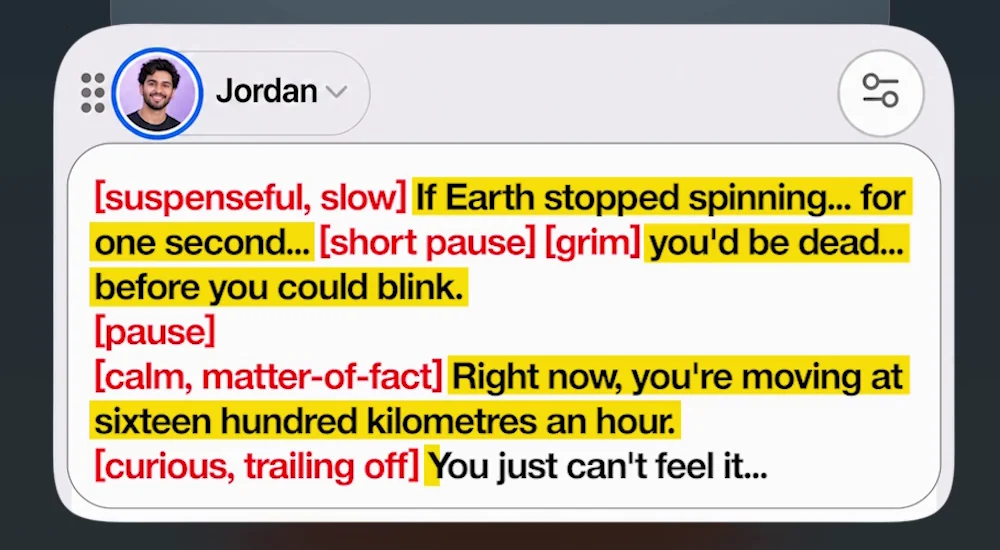
This is the exact script Drama 3 performed in my reel:
[suspenseful, slow] If Earth stopped spinning... for one second... [short pause] [grim] you'd be dead... before you could blink.
[pause]
[calm, matter-of-fact] Right now, you're moving at sixteen hundred kilometres an hour.
[curious, trailing off] You just can't feel it...
Fact check, the way Step 2 does it: Earth's surface spins at about 1,670 km an hour at the equator and slower the further you are from it. Sixteen hundred fits places near the equator. A source link settles details like this before you record.
Step 3: Let Fish Audio Drama 3 perform it
- Open Text to Speech in Fish Audio and sign in.
- In the Settings panel on the right, set Model to Fish Audio Drama 3.
- Click the voice name at the top of the text box and pick a voice that fits your niche: deep and slow for mysteries, bright and quick for fun facts.
- Paste your directed script into the text box, brackets and all.
- Click Generate Speech, listen, then download the audio for your video.
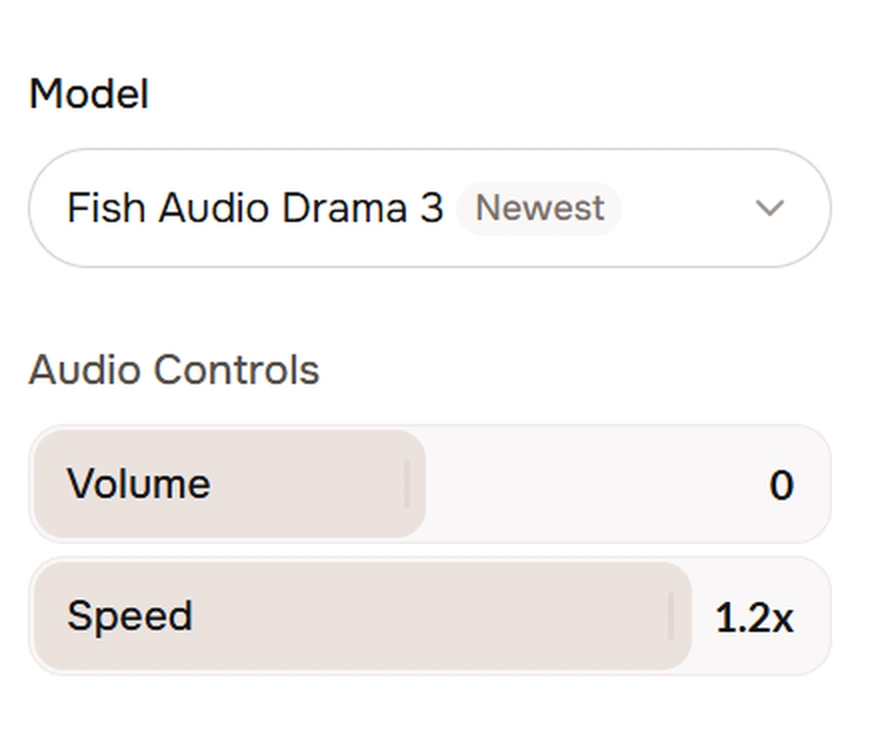
On a free account? The text box on mine takes up to 500 characters per generation. That fits a short script like the one above.
Test: generate your script once without the brackets and once with them, then play both back to back. That's the difference direction makes.
How much does direction change the voice?
A lot. Keep the words, change only the brackets, and you get a different video. Try these two versions of the same line:
[grim, slow] If Earth stopped spinning for one second, you'd be dead before you could blink.

[excited, fast, like you can't wait to tell a friend] If Earth stopped spinning for one second, you'd be dead before you could blink.
The first one opens a horror short. The second opens a fun-facts short. Same words, completely different impact.
cheat sheetWhat can you put in the brackets?
- How to say it, in your own words, before the line: [barely holding it together], [whispering to a friend], [proud, confident].
- Sounds and pauses, exactly where they happen: [shaky breath], [small laugh], [short pause].
- One word or phrase only: wrap it in a paired tag, like
You just <whisper>can't feel it</whisper>. Drama 3 supports<whisper>,<emphasis>,<soft>,<fast>,<slow>,<stress>and<forceful>. - Any language: you can write the directions in your own language, even when the script is in English.
What does it cost, and what are the limits?
- Writing is covered, the voice uses credits. Any Claude plan can write the scripts. In Fish Audio, each generation uses credits from your plan, and Fish says Drama 3 uses the same credits as its S2.1 Pro model.
- Launch offers. New Plus, Pro and Max plans are 50% off for a limited time; check the end date on the plans page. For developers, Drama 3 in the API is 80% off until 30 November 2026: $10 instead of $50 for about 180,000 words of English text.
- Check every fact. A confident voice makes a wrong number sound true, so read the sources Claude gives you.
- Use voices you're allowed to use. Library voices are fine to try. Only clone your own voice, or one you have clear permission to use.
Links 🔗
- Fish Audio — Sign up and try Drama 3
- Drama 3 guide (Fish Audio docs) — Every way to direct a line
- Fish Audio Drama 3: direct AI voices like an actor — Three more builds, plus a tag library
- Build a faceless channel that doesn't sound AI — Choosing a voice and batching a week of scripts
- The complete Claude guide — What each Claude plan includes
Liked this? Get the next one in your inbox.
Every Thursday I research the latest AI systems and workflows, then break the best one down into simple steps, with prompts you can copy. Plus the AI news that changes what you can do.
Free, plus 4 starter guides when you join. One email a week. Unsubscribe anytime.